Wednesday, 26 May 2010

Gmail tips for businesses, big or small

Gmail tips for businesses, big or small: "Editor's note: This is the third post in a series to celebrate National Small Business Week. Previous posts highlighted two businesses (Revenue Spark and Smart Furniture) that have adopted Google Apps to help run IT more efficiently. We’ll now turn to ways that individual tools within the Google Apps suite are being used by small businesses everywhere.

Many businesses that use Gmail tell us it has fundamentally changed the way they manage email and communicate on a daily basis. They’re not alone ‒ since Gmail launched 6 years ago, it has become one of the most popular email applications in the world. However, we find that even avid Gmail users may not know about all the rich features and functionality that can help them work smarter.

To get every business up to speed, we posted some tips on today’s Gmail Blog for getting the most out of Gmail at work. Take a look, try them out, and feel free to share them with your colleagues.

Posted by Michelle Lisowski, the Google Apps team


"

Thursday, 20 May 2010

Hands-on with the Android Kindle app [#io2010]

Hands-on with the Android Kindle app [#io2010]: "

Amazon Kindle app for Android

The Android Amazon Kindle app: Coming this summer. The Android Amazon Kindle hands-on video: Coming right now, after the break. It's not a bad little app. Download and read ebooks right on your phone, change the font size and background color, and all the usual bells and whistles you'd expect. Check it out.


read more


"

Friday, 14 May 2010

Five more languages on translate.google.com

Five more languages on translate.google.com: "(Cross-posted from the Google Translate Blog)

At Google, we are always trying to make information more accessible, whether by adding auto-captioning on YouTube and virtual keyboards to search or by providing free translation of text, websites and documents with Google Translate. In 2009, we announced the addition of our first “alpha” language, Persian, on Google Translate. Today, we are excited to add five more alpha languages: Azerbaijani, Armenian, Basque, Urdu and Georgian — bringing the total number of languages on Google Translate to 57.

These languages are available while still in alpha status. You can expect translations to be less fluent than for our other languages, but they should still help you understand the multilingual web. We are working hard to “graduate” these new language out of alpha status, just as we did some time ago with Persian. You can help us improve translation quality as well. If you notice an incorrect translation, we invite you click 'Contribute a better translation'. If you are a translator, then you can contribute translation memories with the Translator Toolkit. This helps us build better machine translation systems especially for languages that are not well represented on the web.

Collectively, Armenian, Azerbaijani, Basque, Georgian and Urdu have roughly 100 million speakers. We hope that these speakers can now more easily access the entire multilingual web in their own language. Try translating these and other languages at translate.google.com. Here are some phrases from the new alpha languages to get you started:

Baietz lehenengoan
میں خوش قسمت محسوس کر رہا ہوں
բախտաւոր եմ զգում
Mən şanslıyam
იღბალს მივენდობი

Posted by Ashish Venugopal, Research Scientist


"

Thursday, 13 May 2010

Google Maps for Android Gets Biking Directions, Navigation Shortcut, Sharing, and More

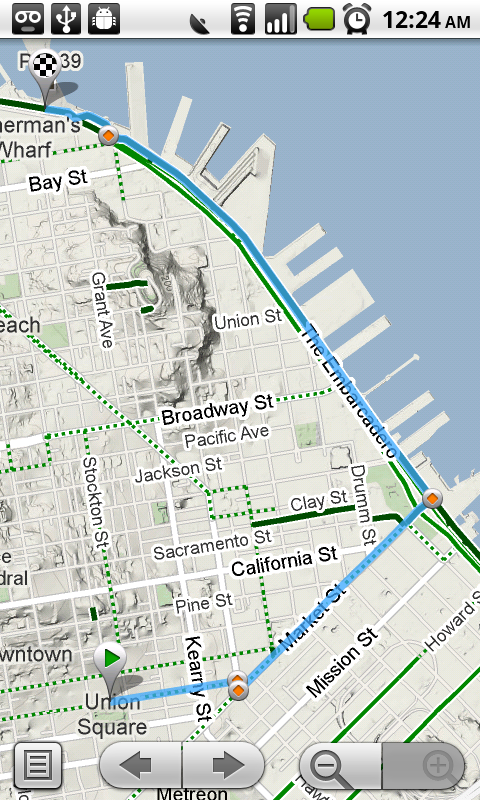
Google Maps for Android Gets Biking Directions, Navigation Shortcut, Sharing, and More: "Starting today, Google Maps for mobile has a few new ways to help you and your friends quickly get to where you’re going whether you’re on 4 wheels or 2 (or maybe even 3). With Google Maps 4.2 for Android you can now get biking directions on the go, start Navigation from your Home screen, share places with friends, and more.

Biking directions
Since launching biking directions on desktop Google Maps, we’ve wanted to get you biking directions, lanes, and trails on your phone too. Just in time for National Bike Month, select the bike icon when getting directions to get an optimal bicycling route in the U.S. If you’re in the mood for a more scenic ride, you’ll also see the Bicycling layer on the map which shows dedicated bike-only trails (dark green), roads with bike lanes (light green), or roads that are good for biking but lack a dedicated lane (dashed green). You can always turn on this layer from the Layers menu to pick your own route. Add in the Labs’ Terrain layer, and you can decide to either climb or avoid that big hill on the way home!


Google Navigation shortcut
If you’re driving instead of riding, we wanted to make it easier and faster for you to get on the road with Google Maps Navigation as soon as you’re ready. With the new Navigation shortcut, you can pick a destination and be on your way with as little as 2 taps of your finger. Select the “Navigation” icon in your phone’s app launcher to get the new destination selection view. Then, speak or type your destination, pick one from your contacts, choose a starred place, or select a recent destination. Navigation will begin and you’re good to go. Make it even easier on yourself by adding the Navigation icon right on your Home screen.


Sharing
Once you figure out where you’re going, why not get some friends to meet you there? From any search results page, choose to “Share this place” to send that place’s info, such as its address and phone number, to whomever you like. If you want to meet someone on a street corner or gather friends at an outdoor concert, you can also send an exact location from the map -- even a snapshot of your current location. Just use the share option after selecting a point on the map, your “My Location” blue dot, or yourself in Latitude if it’s enabled. Whether you’re sharing a place or a location, you’ll be able to send it to small groups via an email or text message or send it widely with apps like Google Buzz, Facebook, or Twitter.

Get these new features by searching for Google Maps in Android Market from Android 1.6+ phones (On your phone now? Tap here). Update Maps to version 4.2, available in all the countries and languages where Maps is currently available. Visit our Help Center to learn more, ask questions in our Help Forum, or give us suggestions and vote on other people’s on the Mobile Product Ideas page.

Posted by Michelle Chen, Software Engineer, Google Mobile Team


"

What’s different about the new Google Docs?

What’s different about the new Google Docs?: "Editor’s Note: This post is more technical than most posts on the Google Docs blog.

A month ago we introduced the latest version of the Google document editor. The new editor comes with features like a ruler, tabs stops, and floating images. Those features might seem pretty basic, but they’re nearly impossible to support in a regular online text editor. This post unwraps some of the core technical changes with the new editor to make this new functionality possible.

The old Google documents

As background, most online text editors (including the old Google documents) use an editable HTML element, which means the application tells the browser to make a certain string of text editable, and the browser takes care of letting the user edit that text. So when you type in the old Google document editor, the browser inserts the characters you type into the page’s HTML. Likewise, when you bold a word, the browser changes the HTML so that the word displays as bold.

Relying on the browser like this has several advantages:
  1. Easy implementation -- Browsers know when a user triple clicks, they want to select an entire paragraph. The application doesn’t need to think about these basic text behaviors.

  2. Easy to make it fast -- The browser (not the app) handles the most computationally intensive task: text layout. Since layout is a core component of browser functionality, you can trust that layout performance has already been heavily optimized.
But using the browser’s native text editing means less control over how the document behaves: if one browser has a bug in its list behavior, people using that browser will have trouble working with lists in Google Docs and we won’t be able to fix the behavior for them. It also means we can support only the least common denominator of features: if inserting tabs works in some browsers but not others, we can’t really support it because the doc won’t look right if you open it in a browser that doesn’t understand tabs.

The new Google documents

To get around these problems, the new Google document editor doesn’t use the browser to handle editable text. We wrote a brand new editing surface and layout engine, entirely in JavaScript.

A new editing surface

Let’s start by talking about the editing surface, which processes all user input and makes the application feel like a regular editor. To you, the new editor looks like a fairly normal text box. But from the browser’s perspective, it’s a webpage with JavaScript that responds to any user action by dynamically changing what to display on each line. For example, the cursor you see is actually a thin, 2 pixel-wide div element that we manually place on the screen. When you click somewhere, we find the x and y coordinates of your click and draw the cursor at that position. This lets us do basic things like slanting the cursor for italicized text, and it also allows more powerful capabilities like showing multiple collaborators’ cursors simultaneously, in the same document.

Multiple users editing in the same paragraph

A new layout engine

By far the most difficult thing the editor does is figure out where to draw text. For this, we built a new layout engine. Here’s an example of how the new engine works: say you type the letter ‘a’. We notice you pressed the ‘a’ key and respond by drawing a single ‘a’ off-screen. We then measure the width and height of that ‘a’, combine those measurements with the x and y position of your cursor, and place the ‘a’ at the correct spot on the screen. If you’re in the middle of a word, we push the characters after your cursor over. If you’re at the end of a line, the editor moves your word to the next line and pushes any overflow to the lines after it.

Tab stops and other basic features are impossible to support if you’re using the browser’s HTML layout engine for your text. That’s why we wrote our own engine: once we tell our layout engine how to draw a feature, we don’t have to worry about which features browsers support.

The formatting in this basic menu couldn’t be supported without writing a new layout engine

Improved collaboration

What I’ve just described is pretty standard architecture for a desktop word processor. But the new Google Docs isn’t just an online version of existing desktop software: it’s designed specifically for character-by-character real time collaboration. That kind of collaboration is only possible because we built the editor around a technology called operational transformation. It’s what lets multiple people edit the same area of a document at the same time without needing to wait for the server to say a particular edit is okay.

Building an extensible, fully collaborative online word processor required rewriting every part of the document editor from scratch. We’re still adding more features and polish before turning it on for everyone, but for an early peek, you can opt-in by visiting the Editing tab in the Google Docs settings.

Posted by: Jeff Harris, Product Manager, Google Docs


"

Google Maps for Android Now Offers Biking Directions

Google Maps for Android Now Offers Biking Directions: "

Google today announced that Google Maps 4.2 for Android will offer biking directions. Simply select the bike icon and Google Maps for Android will provide you with a bike-friendly map with directions to your destination. Google Maps now includes biking directions, lanes and trails. With this update, we’ll patiently wait for the Nexus One bike dock.


via Google Mobile Blog


"

Sunday, 31 January 2010

"Barack, I know Abe Lincoln...

So I said to him, "Barack, I know Abe Lincoln, and you ain't Abe Lincoln."

You cannot help the poor by destroying the rich.
You cannot strengthen the weak by weakening the strong.
You cannot bring about prosperity by discouraging thrift.
You cannot lift the wage earner up by pulling the wage payer down.
You cannot further the brotherhood of man by inciting class hatred.
You cannot build character and courage by taking away people's initiative and independence.
You cannot help people permanently by doing for them, what they could and should do for themselves.


........Abraham Lincoln

Friday, 08 January 2010

Gmail on Nexus One

Gmail on Nexus One: "Posted by Anna de Paula Hanika, Android Product Marketing Manager

Not only does the just-announced Nexus One have a beautiful display, snappy processor, and five megapixel camera complete with flash and geotagging, but you can also buy it online with or without a service plan. Plus, it runs Android 2.1, which adds a couple of new features to the native Gmail application:
  • Quick contact badge: Press the contact status icon within Gmail, and a handy box shows all of the ways you can reply to a contact — including email, chat, SMS, and Facebook.
  • Voice input: Swipe the keyboard, then just speak to select contacts or write an email, complete with punctuation. Period!


Nexus One also features the Gmail updates of Android 2.0, including:
  • Multiple Gmail accounts: Sync multiple accounts to the same device and switch between them without leaving the app.
  • Undo: A handy 'undo' link makes it easier to retrieve messages when you hit archive or delete by mistake. (Note: you can't yet undo send as you can with the desktop version of Gmail).

For more information on Nexus One visit google.com/phone. To learn more about Gmail on this and other Android devices, check out the Gmail page on mobile.google.com/android, or watch this video:


"

Wednesday, 09 December 2009

Sort by relevance, export all and more

Sort by relevance, export all and more: "Over the next few days, we will be enabling several new features in your Docs list.

Sort by relevance

The first is the addition of relevance ranking in your Docs list search results. Until now, anytime you searched for a document, the results were sorted by 'last modified date'.


Now, your search results will display the items most relevant to your search at the top of the list. We also added a new menu on the right side of the toolbar, which lets you decide whether you'd like to sort your Docs list by 'Relevance,' 'Starred' or 'Last Modified'.

This improvement to search within Docs also includes automatic stemming and synonyms. So if you search for 'check account', we'll also include results for a few variations of those words, including 'checking account' (which is what you probably meant to type). Or if you search for 'mac book', we'll also include results for 'macbook'.

Export all your files

There's also more good news from the Data Liberation Front. A few weeks ago we launched the new 'Export...' functionality. Today, we added an 'Export all' option, which lets you export all your docs (up to 2GB at a time) with one click. This is the equivalent of almost 100,000 Google Docs.


You can also export a single file and email it to anyone you'd like in a single step. Once you select an item, click 'Share' and select 'Email as attachment...'. Then pick which format (PDF, MS Office, etc.) you want to use to send the item, compose your email, and hit send.


Sunsetting Email-In Your Documents and Files

Lastly, a change that we aren't excited about. We're removing the existing 'email-in' feature. As you may know, it's been a bit buggy recently and only supports a small subset of document types compared to the Docs list. In order to address this, we'll be taking down the feature and working on a bringing it back in the future with more functionality and better integration.

In the meantime, you can use the multi-file upload in your Docs list or the GData API to programatically upload docs. You can also take attachments from GMail and open them in Google Docs.

If you have any questions, please let us know over on the forum.

Posted by: Vijay Bangaru, Product Manager, Google Docs


"

Wednesday, 25 November 2009

Get movie trailers and more with Google Search for mobile

Get movie trailers and more with Google Search for mobile: "Heads up, movie fans -- today we've launched a mobile version of our new Google Search results for movies, which makes it easier to plan a trip to the movies. Just go to google.com in the web browser on your iPhone, Palm WebOS, or Android-powered device, search for 'movies', and then tap on the 'More movies' link. From there, you can either browse a list of movies or select the 'Theaters' button to browse a list of theaters near you.

Our new movie listings page now includes buttons to play trailers right on your phone, ratings and categories, movie posters, upcoming showtimes, and a concise list of the nearest theaters and their distances from you. We keep information on this page succinct so you can quickly browse through shows and showtimes to help you decide which movie to see. If you want more details about a specific movie, just touch the poster or movie title and you'll see our new movie details page that has a synopsis of the movie, a more detailed list of showtimes, the cast and crew, and pictures. Watch our trailer for a quick demo:


When you browse by theater, you'll see a map of the theaters nearest to you. Then, just tap on the link to any particular theater to see what shows are playing there and what times they're playing. Of course, you can also search for specific movies or theaters and see their listings right away. Try searching for recent movies like 'New Moon' or 'Where the Wild Things Are' or search for 'glendale 18 los angeles'.

If you enjoy searching for movies with Google nearly as much as we have during testing, then this will be the beginning of a beautiful friendship. Our new search results for movies are available in English in the US, UK, Canada, Ireland, Australia, and New Zealand. As always, let us know your feedback. This conversation can serve no purpose anymore. Goodbye.

Posted by Nick Fey, User Experience Designer, Google mobile team


"

Friday, 20 November 2009

Automatic captions in YouTube

YouTube...

Automatic captions in YouTube: "Since we first announced captions in Google Video and YouTube, we've introduced multiple caption tracks, improved search functionality and even automatic translation. Each of these features has had great personal significance to me, not only because I helped to design them, but also because I'm deaf. Today, I'm in Washington, D.C. to announce what I consider the most important and exciting milestone yet: machine-generated automatic captions.

Since the original launch of captions in our products, we’ve been happy to see growth in the number of captioned videos on our services, which now number in the hundreds of thousands. This suggests that more and more people are becoming aware of how useful captions can be. As we’ve explained in the past, captions not only help the deaf and hearing impaired, but with machine translation, they also enable people around the world to access video content in any of 51 languages. Captions can also improve search and even enable users to jump to the exact parts of the videos they're looking for.

However, like everything YouTube does, captions face a tremendous challenge of scale. Every minute, 20 hours of video are uploaded. How can we expect every video owner to spend the time and effort necessary to add captions to their videos? Even with all of the captioning support already available on YouTube, the majority of user-generated video content online is still inaccessible to people like me.

To help address this challenge, we've combined Google's automatic speech recognition (ASR) technology with the YouTube caption system to offer automatic captions, or auto-caps for short. Auto-caps use the same voice recognition algorithms in Google Voice to automatically generate captions for video. The captions will not always be perfect (check out the video below for an amusing example), but even when they're off, they can still be helpful—and the technology will continue to improve with time.

In addition to automatic captions, we’re also launching automatic caption timing, or auto-timing, to make it significantly easier to create captions manually. With auto-timing, you no longer need to have special expertise to create your own captions in YouTube. All you need to do is create a simple text file with all the words in the video and we’ll use Google’s ASR technology to figure out when the words are spoken and create captions for your video. This should significantly lower the barriers for video owners who want to add captions, but who don’t have the time or resources to create professional caption tracks.

To learn more about how to use auto-caps and auto-timing, check out this short video and our help center article:


You should see both features available in English by the end of the week. For our initial launch, auto-caps are only visible on a handful of partner channels (list below*). Because auto-caps are not perfect, we want to make sure we get feedback from both viewers and video owners before we roll them out more broadly. Auto-timing, on the other hand, is rolling out globally for all English-language videos on YouTube. We hope to expand these features for other channels and languages in the future. Please send us your feedback to help make that happen.

Today I'm more hopeful than ever that we'll achieve our long-term goal of making videos universally accessible. Even with its flaws, I see the addition of automatic captioning as a huge step forward.

* Partners for the initial launch of auto-caps: UC Berkeley, Stanford, MIT, Yale, UCLA, Duke, UCTV, Columbia, PBS, National Geographic, Demand Media, UNSW and most Google & YouTube channels.

Posted by Ken Harrenstien, Software Engineer


"